Upgrade planning
Hero Gear Optimizer: Plan Your Upgrade Order
Turn your 12 Hero Gear states, available materials, and combat priority into a resource-aware upgrade plan.
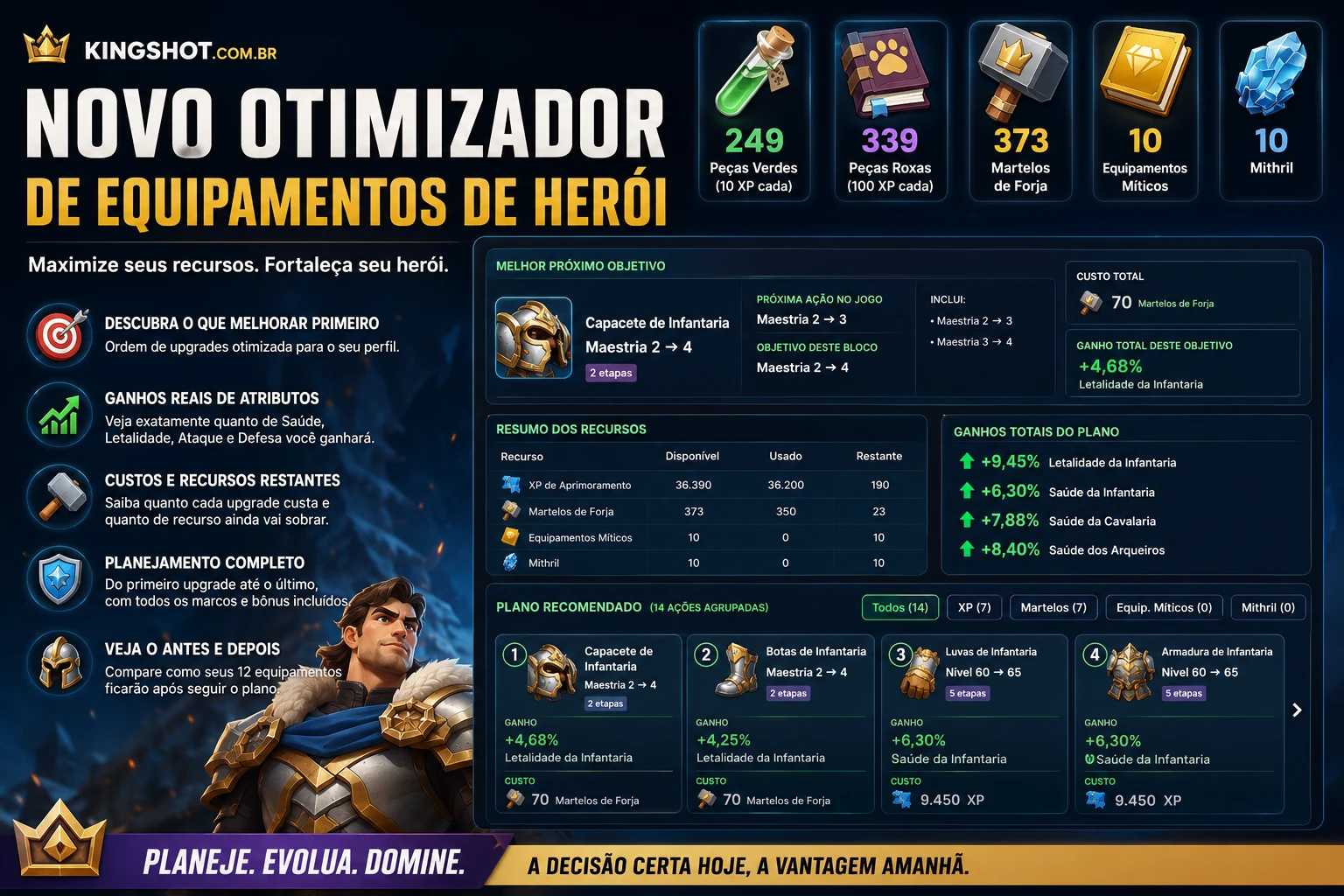
The Hero Gear Optimizer helps you compare valid upgrades against the resources currently available on your account.
Enter your gear and resources
Add:
- Your 12 Hero Gear items
- Green and purple Enhancement XP items
- Forge Hammers
- Mythic Gear
- Mithril
What the optimizer shows
- Which upgrade to make first
- The best upgrade order
- How much each upgrade will cost
- Which stats each upgrade improves
- How many resources you will have left
- How your gear will look after completing the plan
You can also choose your priority, including:
- Tough Infantry
- Archer Damage
- Cavalry
- Bear Hunt
- Arena / PvP
Try it now
Treat the plan as a transparent planning aid: review its costs and stat gains, then confirm the chosen upgrade in game before spending materials.
What information you enter
The optimizer models all 12 Hero Gear positions: four slots for Infantry, Cavalry, and Archers. For each piece, record its quality, Enhancement level, Mastery level, and Red Imbuement milestone where applicable.
Then add the resources available for this plan: Enhancement XP as either green and purple XP items or a manual total, plus Forge Hammers, Mythic Gear, and Mithril. Choose one of the supported priorities—Balanced, Tough Infantry, Archer Damage, Cavalry, Bear Hunt, or Arena / PvP—to guide the order.
What the recommendation contains
The result identifies a best next objective and a next in-game action, then groups compatible level-by-level actions into a readable plan. Each recommendation shows its material cost, projected stat gains, and the reason it fits the selected priority.
The resource summary separates the starting amount, amount spent, and amount remaining. The result also compares stats before and after the plan, previews the final state of all 12 pieces, and keeps the raw action sequence available for inspection.
How to use the result
- Confirm that every gear level and material count matches the game.
- Check the selected priority; changing it can change which stats receive more weight.
- Start with the best next objective, but read its cost, gain, and explanation before acting.
- Use the remaining-resource totals to decide whether to complete the whole plan or stop after an earlier action.
- Verify the final upgrade in game. The optimizer uses locally maintained progression data and is a planning aid, not an automatic game action.